
 Washing machines Indesit They are of good quality, but they can also break down. Sometimes, an Indesit washing machine won't turn on for no apparent reason.
What could be the reasons? Let's look into it.
General information
The most common causes of breakdowns
- – no electricity;
- – the machine turned off;
- – the power outlet does not work;
- – the power cord is damaged;
- – the power button does not work;
- – the control unit broke.
Let's take a closer look at each cause and see how to fix these problems.
Details of the question
Problem in the power grid
If your washing machine Indesit If your washing machine has shut off and isn't showing any signs of life, don't panic. The problem isn't necessarily with the washing machine. There may be a problem with the electrical system. If there's power throughout the apartment and other outlets are working, check the power to the outlet. Simply unplug the washing machine and plug another known working appliance into the same outlet. If the appliance doesn't turn on, the outlet needs to be repaired. You can do this yourself if you have the necessary skills, or call a professional.
Important! Disconnect the power supply before servicing the outlet.
The problem is in the FPS or network drive.
If you've checked the outlet and everything is fine, then we continue troubleshooting. Inspect the washing machine's power cord. It may be broken. Test it with a multimeter. You should also check the EMI filter or capacitor. In Indesit washing machines, the EMI filter is connected to the power cord. They should be removed together.

Let's figure out how to do this.
- Disconnect all unnecessary components from the washing machine. Unplug it. Turn off the water and remove the inlet hose, then the drain hose. Be careful with these hoses; there may be some water left in them.
- Next, turn the machine so its back is facing you and remove the cover. Loosen the screws, pry the top cover up, and remove it.
- In the upper left corner, under the cover, you'll find a capacitor. It needs to be removed from its mountings.
- The power cord is also held in place by a special clip. It will also need to be disconnected.
- Now we can get the FPS out of the washing machine with the wire.
Next, we check each of these components separately. First, test the power cord with a multimeter. If there's no continuity, there's a short. This should be corrected by replacing the cord.
If the problem isn't with the wire, then check the capacitor. We'll also need a multimeter for this. Attach the probes to the contacts and test the circuit. Then, set the device to measure voltage and check the FPS again. If the reading is 0 or 1, then we can confidently say the capacitor is broken and will need to be replaced.
The problem is in the varistor or control microcircuit
If checking the network, cord, and capacitor doesn't reveal a faulty component and the indicators don't light, the varistor may be the culprit. This component controls the microcircuit and protects it from excessive voltage. For this reason, they often burn out during strong power surges. The good news is that the circuit remains intact, and the varistor is easy to replace. We'll discuss how to do this below.
- We pull out the detergent drawer. On Indesit washing machines, there are two screws underneath. Unscrew them.
- There are three more screws under the washing machine lid that secure the control panel. Remove them as well.
- Now you can pull out the panel itself.
- Next, you need to disassemble this block and remove the control microcircuit.
- On this panel we find the varistors and measure the voltage on them with a multimeter.
- If you find a burnt-out varistor, unsolder it using a soldering iron and replace it with a new one.
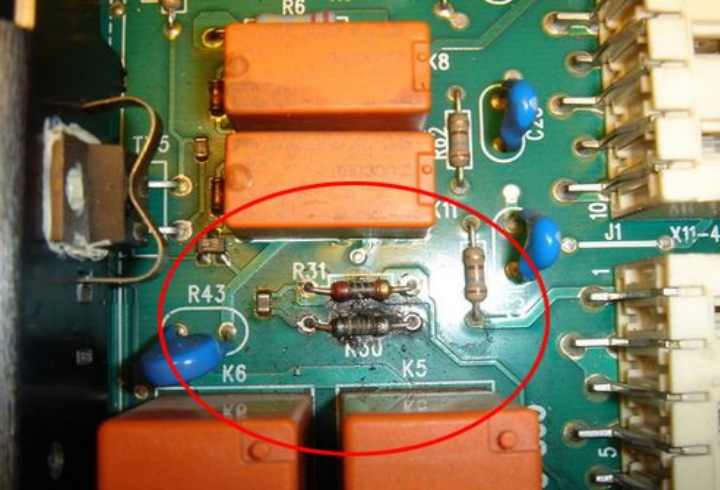
Important! Be very careful when soldering and unsoldering varistors. Be careful not to damage the tracks!
If all the varistors are OK, inspect the circuit. The tracks or other components may be burned out. If you find a problem, don't rush to fix it yourself. It's very easy to damage a microcircuit, and buying a new one is quite expensive.
Note! Service centers usually replace the board with a new one. Repairing it there can be prohibitively expensive. Try contacting a private repairman. Their repairs will be cheaper.
The on/off button is broken
Why else might a washing machine not work? IndesitIf your washing machine is quite old, the problem is most likely with the power button. This is a problem with almost all Indesit machines manufactured 15 years ago. They have their own "Achilles heel": if the power button shorts, the entire washing machine is cut off.
To check this, remove and disassemble the control module as described above and measure the resistance of the button in its on position with a multimeter. If the problem is detected, replace it with a new one.
The indicators are blinking or not lit. with the machine turned on
Please note that if there is a problem, for example, with the spin cycle or all the indicators of your washing machine are flashing, then the problem is also in the microcircuit.
There may be a system failure. Try unplugging the washing machine for a few minutes. If the problem persists, check the manual for instructions on how to reset your specific model. Also, blinking or dimming lights may indicate a poor connection. Ring the wires and check the contacts. They may have become loose due to vibration.
Important! If the lights flash in a specific pattern, it's the machine's signal that a specific fault has occurred. You can find out which one exactly in the user manual.
We found out why the washing machine Indesit It may not turn on at all, or the indicators may be on or flashing constantly. If all of these steps don't help, contact a repair shop. A specialist will be able to pinpoint the cause of the problem and bring your home assistant back to life.


